
Smart Home Automation in Thousand Oaks
Make your home easier to control with smart lighting, climate control, security, entertainment, and connected devices working together. We install and integrate smart home systems for homeowners in Thousand Oaks and nearby Ventura County communities.

What Is Smart Home Automation?
Smart home automation connects different devices and systems so they can be controlled individually or work together through a common interface, app, voice command, schedule, or automation routine.
Instead of operating every device separately, an integrated system can coordinate things such as lighting, climate, security, entertainment, shades, and other connected equipment around how you use your home.
Smart Devices vs. Home Automation
A smart thermostat or smart light can be useful on its own. A home automation system goes further by connecting compatible devices and creating relationships between them.
For example, a “Good Night” scene could be configured to:
- Turn off selected lights
- Adjust the thermostat
- Lock connected doors
- Lower motorized shades
- Arm compatible security devices
The exact functions depend on the devices and control system installed.
Why Integration Matters
A successful smart home isn’t simply a collection of connected products. The devices, network, electrical infrastructure, control interfaces, and automation rules need to work together reliably.
That’s why smart home installation starts with understanding what you want the home to do, rather than simply choosing individual devices.
What Can a Smart Home Automation System Control?
A well-designed smart home can connect several everyday systems instead of leaving each device to operate separately. The exact combination depends on the home, existing equipment, wiring, network, and the control platform selected.
Smart Lighting
Control individual lights, rooms, or groups from a phone, wall control, voice command, schedule, or automation scene.
Lighting can also respond to other parts of the home—for example, turning on selected lights when a security event occurs or adjusting lighting as part of a nighttime routine.
Smart Thermostats & Climate Control
Smart thermostats can provide app-based control, scheduling, and integration with other connected systems. Automation can make climate settings part of broader home routines rather than requiring separate manual adjustments.
Security Cameras, Locks & Doorbells
Smart security devices can include cameras, video doorbells, connected locks, motion sensors, and other compatible equipment. When properly integrated, these devices can be accessed through a common control system rather than managed entirely independently.
Home Audio & Video
Smart home systems can bring televisions, distributed audio, media rooms, and other entertainment equipment into a centralized control experience. A single interface can make it easier to select rooms, sources, volume levels, or predefined entertainment scenes.
Motorized Shades
Motorized shades can be controlled individually or incorporated into automation scenes. For example, shades can be included in a morning, movie, or nighttime routine when the equipment supports that type of integration.
Voice & App Control
Depending on the system, homeowners may control connected devices through a smartphone, tablet, dedicated wall control, or compatible voice assistant.
Networking & Connectivity
The network is an important part of a connected home. Smart lighting, cameras, thermostats, entertainment equipment, and other devices depend on reliable connectivity. Local smart-home providers commonly treat networking as part of the broader automation infrastructure rather than an unrelated add-on.
One System, Multiple Functions
The real advantage comes from integration.
For example, a homeowner might use one scene to combine lighting, shades, entertainment, and climate settings. Another routine could coordinate selected lights and security devices when the home is left.
The goal isn’t simply to add more smart devices. It’s to make the devices you actually use work together in a practical way.
How Smart Home Automation Brings Everything Together
A smart home works best when its individual devices can communicate through the same network and control system.
The basic structure is:
Connected Devices → Network & Control → Automation Rules → User Control
Your lights, thermostat, cameras, locks, shades, and entertainment equipment remain individual systems, but compatible equipment can be coordinated through a central control experience.
Connected Devices
These are the physical components throughout the home—such as smart switches, thermostats, cameras, door locks, shades, speakers, televisions, and other compatible equipment.
Network & Control
The home’s wired and wireless network provides the communication path between devices. Depending on the system, a dedicated controller or compatible control platform can coordinate different technologies.
A reliable network is particularly important when a home has many connected devices or requires coverage across multiple rooms and areas.
Automation Rules
Automation determines when and how devices respond.
For example:
Leaving Home
- Selected lights turn off
- Thermostat changes to an away setting
- Compatible locks secure the doors
- Security devices switch to the appropriate mode
Movie Time
- Living-room lights dim
- Motorized shades close
- Compatible entertainment equipment turns on
Good Morning
- Selected shades open
- Lights adjust
- Climate settings change
These are examples of what an integrated system can be configured to do. The available functions depend on the equipment and how the system is designed.
One Control Experience
Instead of opening a separate app for every device, compatible systems can provide a more unified way to control the home through an app, touchscreen, wall control, voice command, or automated routine.
The objective is simple: fewer disconnected devices and more useful coordination between the systems you actually use.
Smart Home Installation for Existing Homes
You do not need to build a new house to benefit from smart home automation. Many existing homes can be upgraded by working with the electrical wiring, network, and compatible devices already in place.
The first step is understanding what the home can support and what you want the system to accomplish.
Working With Existing Wiring
Existing wiring can affect which smart switches, dimmers, thermostats, and other devices are suitable. A professional installation can identify wiring limitations before equipment is selected, rather than discovering compatibility problems during installation. Local smart-lighting providers also emphasize checking existing wiring when selecting equipment.
Adding Automation Room by Room
A smart home does not have to be automated all at once.
You might begin with:
- Smart lighting in the main living areas
- A connected thermostat
- Smart locks or a video doorbell
- Security cameras
- Audio or entertainment control
Additional rooms and systems can be integrated later when the selected platform supports expansion.
Upgrading an Existing Smart Home
If you already have smart devices, replacing everything may not be necessary.
We can look at the existing equipment, identify what can remain, and determine where new devices or electrical work may be needed. The goal is to create a system that works together rather than adding another disconnected app or device.
When Electrical Work Is Needed
Some smart-home projects are primarily device and configuration work. Others may involve electrical changes such as new wiring, dedicated circuits, switches, outlets, or panel modifications.
When electrical infrastructure needs to change, the project should be evaluated as an electrical installation as well as a technology upgrade.
A good retrofit works with the home you have while creating a practical path for future automation.
Smart Home Pre-Wiring for New Construction & Remodeling
If you’re building a new home or remodeling an existing one, smart-home planning should begin before the walls are closed.
Pre-wiring creates the infrastructure for systems such as networking, lighting control, security cameras, audio/video, motorized shades, and future automation. Planning these locations during construction can avoid difficult wiring changes after drywall and finished surfaces are in place.
What Can Be Planned During Pre-Wiring?
Depending on the project, the plan may include:
- Network and Wi-Fi access-point locations
- TV and entertainment wiring
- In-wall or in-ceiling speaker wiring
- Security camera and doorbell connections
- Smart lighting and control locations
- Motorized shade provisions
- Central equipment or network locations
- Conduit for future wiring
- Electrical power where smart-home equipment will be installed
Not every home needs every option. The wiring plan should follow the way you expect to use the property.
Coordinate Electrical and Low-Voltage Work
Smart-home infrastructure is not simply an extension of the standard electrical rough-in.
Lighting circuits, outlets, power requirements, network cabling, control locations, equipment spaces, and other technology infrastructure may need to be coordinated before construction reaches the finish stage. Clear plans also help electricians, builders, and other trades work from the same layout.
Plan for Future Changes
Technology will change, so pre-wiring should not mean trying to predict every device you might own years from now.
A better approach is to provide sensible pathways, accessible equipment locations, spare capacity where appropriate, and documentation of what was installed. Strategic conduit can also make future additions easier in locations where running new cable later would be difficult.
Remodeling Can Benefit From the Same Planning
A major remodel can provide an opportunity to add wiring while walls or ceilings are already accessible.
Planning at this stage can make it easier to integrate smart lighting, networking, security, entertainment, shades, and other systems without treating each upgrade as a separate project.
Smart Home Networking & Connectivity
A smart home depends on more than the devices themselves. Your network provides the connection that allows compatible lights, cameras, thermostats, entertainment equipment, and other devices to communicate.
For larger homes or systems with many connected devices, network planning becomes especially important. Local Thousand Oaks smart-home providers commonly include Wi-Fi coverage, access-point placement, network equipment, and connectivity as part of their smart-home infrastructure.
Wi-Fi Coverage
The router’s location does not guarantee strong coverage throughout the entire property. Walls, floor plans, building materials, distance, and the number of connected devices can all affect connectivity.
A smart-home installation should consider where devices will actually be used—not just where the internet connection enters the house.
Wired Connections
Some equipment can benefit from a wired network connection, particularly fixed devices such as entertainment equipment, network hardware, or certain security components.
Ethernet cabling can also provide a more predictable connection for equipment that does not need to rely on wireless connectivity.
Network Equipment & Access Points
Larger homes may need strategically positioned access points rather than relying on a single wireless router.
The appropriate setup depends on the home’s size, layout, construction, number of devices, and how the network will be used.
Smart Home Reliability
When a smart device repeatedly goes offline, the problem is not necessarily the device itself. Network coverage, configuration, interference, or the overall system architecture can also be factors.
That’s why networking should be considered part of the smart-home design, rather than something added after every other system has been installed.
Planning the Network Around the Automation
The network should support the actual automation plan.
If a home will have cameras, smart lighting, thermostats, entertainment systems, doorbells, locks, and multiple control interfaces, those requirements should be considered together from the beginning.
Smart Home Systems & Platforms
Smart-home equipment does not all use the same technology or communicate in the same way. The control platform helps determine which devices can work together, how they are controlled, and how automation scenes are created.
Choosing the Right Platform
The best system depends on the home and the equipment you want to connect.
We consider factors such as:
- Which devices you already own
- Lighting and climate requirements
- Security and access-control needs
- Audio and video equipment
- Network infrastructure
- New construction versus an existing home
- How you want to control the system
- Whether you expect to expand the system later
Compatibility matters because a collection of individually “smart” products does not automatically create a unified automation system.
Control4
Control4 is one example of a whole-home automation platform designed to bring compatible lighting, climate, security, audio/video, shades, and other connected devices into a unified control experience. Its current platform supports a large third-party device ecosystem and uses controllers to coordinate connected equipment.
Lutron
Lutron is particularly well known for lighting and shading control. Depending on the system and compatible equipment, its products can form part of a broader smart-home environment.
Savant
Savant is another home-automation platform used to coordinate connected home systems, including lighting, climate, entertainment, security, and other compatible equipment.
The Platform Should Follow the Project
We don’t recommend choosing a platform simply because it is popular.
The important question is whether the platform, devices, wiring, network, and control method work together for your particular home.
For an existing smart home, we can also evaluate the equipment already installed before deciding what should be replaced, retained, or integrated.
The goal is a cohesive system—not a collection of products that happen to connect to Wi-Fi.
Note: platform capabilities and device compatibility can vary by product, software version, and installation. Specific compatibility should be confirmed during system planning.
Smart Home Integration & Upgrades
Already have smart devices in your home? You may not need to start over.
Existing thermostats, lighting controls, cameras, doorbells, locks, entertainment equipment, and other compatible devices can sometimes be incorporated into a broader automation system. The first step is determining what you already have, how it communicates, and what you want the upgraded system to do.
Integrating Existing Devices
Before replacing equipment, we look at:
- Existing smart-home devices
- Electrical and wiring conditions
- Network connectivity
- Device compatibility
- Current control apps and interfaces
- Systems you want to add
If compatible equipment can remain in place, the upgrade can be built around it rather than replacing everything unnecessarily.
Upgrading Outdated Systems
Older smart-home installations can become difficult to manage when devices, controllers, apps, or networking equipment no longer work well together.
An upgrade may involve replacing selected components, improving connectivity, updating control hardware, or reorganizing how different systems communicate.
The objective is to improve the overall system without creating another collection of disconnected devices.
Adding New Automation
You can also expand an existing setup as your needs change.
For example, a home that already has smart lighting could later add:
- Motorized shades
- Climate control
- Security devices
- Audio/video
- Additional rooms
- New automation scenes
Whether an addition can integrate depends on the specific equipment and platform.
Troubleshooting Integration Problems
When a smart-home system stops behaving correctly, the problem may not be the device itself. Compatibility, network communication, configuration, electrical issues, or control-system settings can all contribute.
A proper evaluation helps identify where the problem actually occurs before replacing equipment.
Good smart-home upgrades should make the existing system simpler, more useful, and easier to expand—not simply add more technology.
Our Smart Home Installation Process
Every home has different wiring, network conditions, devices, and automation goals. We start by understanding the property and then build the installation around what you actually want the system to do.
1. Understand Your Home & Goals
We look at the home’s layout, existing electrical and network infrastructure, current smart devices, and the systems you want to control.
2. Evaluate Compatibility & Infrastructure
Before selecting equipment, we consider whether the existing wiring, network, electrical capacity, and devices can support the planned system.
3. Design the System
The system is organized around the way you use the home.
This may include deciding:
- Which rooms should be automated
- Which systems should communicate
- Where controls should be located
- Which devices can work together
- How scenes and routines should operate
- What infrastructure should be prepared for future expansion
4. Install & Integrate
We install the required electrical and smart-home components, connect compatible equipment, and organize the system so the individual parts can communicate properly.
5. Configure & Test
After installation, devices and automation routines are configured and tested.
6. Explain the System
A smart home should not feel complicated after installation.
Why Professional Smart Home Installation Matters
Electrical & Wiring Compatibility
Smart switches, dimmers, thermostats, controllers, cameras, and other equipment may have different installation requirements.
Reliable Network Infrastructure
A home with many connected devices can place greater demands on its network.
Device & Platform Compatibility
Not every smart device works with every automation platform.
Proper Integration & Testing
Installing individual devices is only part of the job.
Easier Future Upgrades
A well-planned system can also make future changes easier.
Smart Home Automation in Thousand Oaks & Nearby Communities
Smart-home projects can look very different from one property to another. A newer home may need planned networking, lighting control, and pre-wiring, while an existing home may need selected upgrades and integration with equipment already installed.
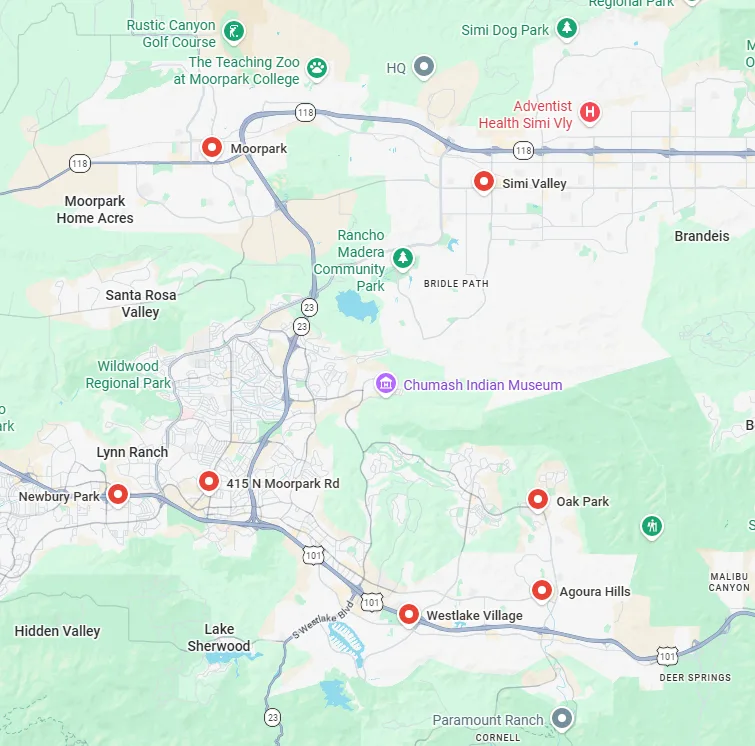
We provide smart home installation and integration for homeowners in Thousand Oaks and nearby Conejo Valley communities, including:
- Thousand Oaks
- Newbury Park
- Westlake Village
- Oak Park
- Agoura Hills
- Moorpark
- Simi Valley
Why Choose Us for Smart Home Installation?
Smart-home projects often involve more than selecting devices. Electrical work, wiring, networking, equipment compatibility, and automation all need to fit together.
Our approach is built around that complete picture.
Electrical & Smart Home Knowledge Together
Smart-home equipment ultimately operates within a real building—with electrical circuits, switches, outlets, wiring, and network infrastructure.
When a project requires electrical work as part of the automation, having that work considered alongside the smart-home installation helps keep the system coordinated.
Solutions Built Around the Home
We don’t treat every property as the same installation.
An existing Thousand Oaks home may need a different approach from a new construction project or major remodel. We consider the home’s layout, existing infrastructure, equipment, and the way you want to use the system.
Integration Instead of Isolated Devices
The objective is not simply to install the largest possible number of smart products.
We focus on making compatible systems work together—so lighting, climate, security, entertainment, shades, networking, and other connected equipment can form a practical automation system.
Room to Grow
A smart-home project can be completed in stages when that makes more sense for the property.
The initial installation can be planned with future additions in mind, helping you expand the system without unnecessarily rebuilding what is already working.
Local Service
We serve homeowners throughout Thousand Oaks and surrounding Conejo Valley communities, with the electrical and smart-home work planned around the individual property.
Smart Home Automation FAQs
We can integrate compatible systems such as smart lighting, thermostats, security devices, locks, doorbells, audio/video equipment, motorized shades, networking, and other connected technology. The exact options depend on the equipment and control platform.
Yes. Many existing homes can be upgraded without completely rebuilding the electrical or technology infrastructure. The appropriate approach depends on the home’s wiring, network, construction, existing equipment, and the level of automation you want.
No. A smart-home system can often be developed in stages. You might begin with lighting, climate control, security, or another priority and expand later when the selected equipment and platform support additional integration.
Sometimes. We evaluate the existing devices, network, wiring, and control platform to determine what can be retained and integrated. Compatibility should be confirmed before assuming that different products will work together.
Not always. Existing homes may use wired, wireless, or hybrid solutions depending on the project. However, some installations benefit from new electrical wiring, network cabling, or other infrastructure.
Yes. Many connected devices depend on reliable network connectivity. Larger or more device-heavy installations may require additional access points, wired connections, or other network improvements.
Yes. Planning early allows electrical wiring, network cabling, equipment locations, controls, and future expansion to be considered before walls and finished surfaces limit access.